Compact crossover from Smart (Mercedes-Geely JV). Premium finish, compact for Gulf cities.
⚡ Battery Electric9 commands11 apps4 Gulf tips4 quick tasks6 hacks1 quiz questionsSome estimatesModel 2026 · first launched 2023Reviewed 22 May 202611 min read
This is a model-family guide; the selected trim's figures come from its car record above. Technical content is temporarily inherited from smart #1; verify the model year and software build before using commands.
Overview
City commuters wanting premium compact EV.
Mercedes-designed interior
Geely SEA platform — shared with Zeekr X
Beats audio + ambient lighting
Watch the car
A quick EV Gulf promo built from verified car photography, plus any available official footage—all playable on-site and ready to share.
EV Gulf Video HubA dedicated video for every guide car
Watch the smart #1 Premium
2 OEM videos + an EV Gulf spec film
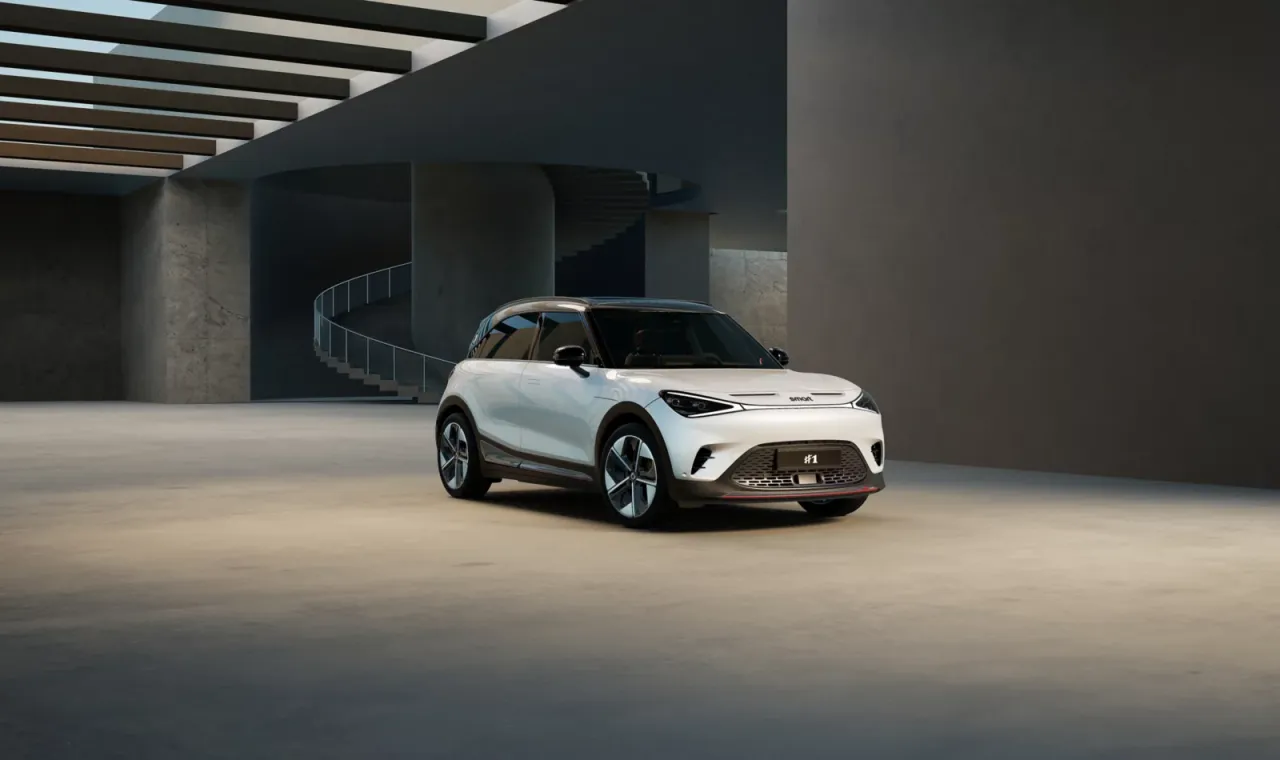
A car worth knowing
smart #1 Premium 2026
Range570 kmBattery66 kWhPower272 HP0–1006.7 s
EV Gulf
Charging
Home · AC
22 kW
~4h full charge
22 kW AC faster than rivals.
Connector: Type 2
Fast · DC
150 kW
10–80% in 30 min
150 kW DC.
400V · Connector: CCS2
Cost per charge
≈ 0.17 OMR
home, 0–100%
Gulf charging notes
22 kW AC = fast home charging with 3-phase wiring.
The community-proven kit to get YouTube, Google Maps and an Arabic keyboard onto your imported car's screen
•GBox (free): runs Google services — YouTube, Google Maps, Netflix — in a sandbox on GMS-less screens
•Aurora Store (free, open source): download Play Store apps with no Google account, straight from the screen
•Gboard: Arabic/English typing replacing the Chinese-only factory keyboard on imports
•Google Maps or Waze on the factory screen — full Gulf coverage unlike the Chinese factory nav
•Install: ADB from a laptop (adb install -g) — the same path i99dash uses. On BYD install AppManager first to unlock installs
Proven by thousands of owners (XDA + Russian and Gulf communities). Verified caveats: BYD removed ADB in v1.7+ (newer units need a downgrade or an AI Box), OTA updates can wipe apps, and video on the driver screen while moving is illegal and unsafe. APKs must be arm64-v8a.
Adds Apple CarPlay and Android Auto to any Android car screen
•Full CarPlay + Android Auto, wired and wireless
•No wiring changes — plugs into USB, fully reversible
•Online firmware upgrades via the AutoKit app
Thousands of Amazon owner reviews — the standard in the head-unit scene. On newer locked BYD DiLink units owners use the AI Box hardware variant instead of the APK — warranty-safe and non-invasive.
Unlocks YouTube, IPTV, video and web browsing inside Android Auto — free and open source
•Local video, IPTV (m3u) and YouTube on the car screen via Android Auto
•Built-in web browser and screen mirroring
•Works without root on Android 14/15/16
Installs on your phone (not the head unit) and needs developer mode + Unknown sources in Android Auto settings. For cars with Android Auto. Video while driving is unsafe and illegal — passengers and parked use only.
•Works with any ELM327 Bluetooth adapter (~$10-30)
•Reads/clears fault codes on most brands
Used-buyer alert: true battery health (SOH) is NOT exposed via standard OBD on BYD — you get SoC and voltages only. For an authoritative report before buying a used BYD: dealer diagnostic (VDS) or a pro tool like the Foxwell NT710.
Smart serviced via Mercedes-Benz network — present in all GCC.
Summer Survival Mode
0/10 · 0%
Checklist to prep your EV for 50°C summers. Each item extends battery life and improves your daily drive.
Keys & Access
Smart App
Recommended
Bluetooth + UWB.
NFC card
Backup.
Key fob
Premium remote.
Driving Assist
Smart Pilot Assist 2.0
L2
Highway autopilot.
AEB + Pedestrian
AEB.
Safety
⭐
EuroNCAP 5 stars
Top safety.
🎈
7 airbags
Comprehensive.
Quick Tasks
How do I X — quick tasks every owner should know.
❄️
Pre-cool before driving
Open the car app
Climate → Pre-cool
Set timer (5-15 min)
Get in cooled
🌙
Schedule night charging
Plug in
Charge → Schedule
Set 23:00 - 06:00
Save — car charges automatically
🏕️
Camp Mode for sleeping
Park in P
Activate Camp Mode from menu
AC stays on without key
Uses ~1 kWh/hour
🔄
Software update
Connect to WiFi
Settings → Software → Check Update
Accept if available
Updates while parked (30-90 min)
Hacks & Secrets
Hidden features, easter eggs, and tricks you won't find in the manual — from real owners.
🌴Gulf-Specific
Pre-cool from the app at home
Open the car app 10 min before leaving. Cabin cools, battery pre-conditions for charging. Saves time, max comfort in 50° summers.
💰Money Saver
Schedule charging at off-peak rates
In countries with time-of-use rates (UAE Slab 1), schedule 23:00-06:00 to save 20-40% on your electricity bill.
🛋️Comfort
Camp Mode for sleeping or waiting
Park in P, enable Camp Mode from menu or voice command. AC stays on, screens dim. Uses only ~1 kWh/hour.
🚀Performance
Max regen for less brake wear
Set regen to highest (One-Pedal or High). Cuts brake wear 60%+ and adds 5-10% range in city traffic.
💰Money Saver
Bump tire pressure +0.2 bar in summer
A small bump (~0.2 bar above recommended) reduces rolling resistance and adds 3-5% range. Also a heat-safety win.
💡Tip
smart #1/#3 — the mirror adjustment shortcut
Mirror settings are buried in menus — but tap the physical seat controls and the mirror menu pops up automatically, ready to adjust with the wheel buttons. Also stack adjustable regen with e-Pedal for near-one-pedal driving.
Share a new hack in the community to get it added to this guide.
Test Your Knowledge
Question 1 / 1Score: 0
Smart partners?
Agent & parts
FAQ
Check the dealer list or import directly. Official presence varies per model.
Spotted outdated info?
We refresh guides regularly. Share your experience in the community.